Customer Testimonial Instagram Carousel: Showcase Social Proof
Building trust online is one of the most challenging aspects of modern marketing. While you can talk about your product’s features all day, nothing speaks louder than the words of a satisfied client. However, presenting these reviews in a way that is visually engaging and easy to digest requires more than just a screenshot. That is where a dedicated Customer Testimonial Instagram Carousel comes into play. It is not just a set of slides; it is a strategic design asset that transforms raw feedback into a compelling narrative.
The Visual Appeal: Modern Layouts and Vibrant Pastels
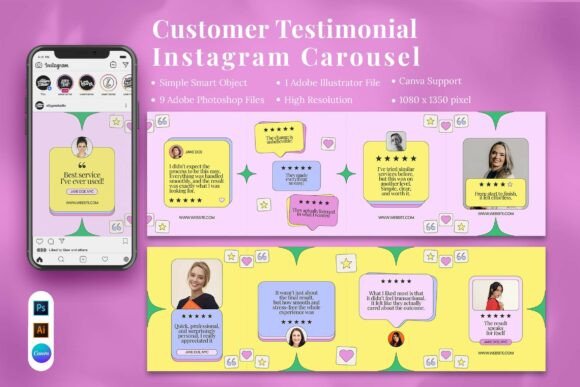
First impressions matter, especially on a visual platform like Instagram. This template collection moves away from the harsh, high-contrast colors often seen in corporate branding, opting instead for a softer, more approachable aesthetic. The use of vibrant pastel colors creates an immediate sense of calm and friendliness, which is crucial when you want a potential customer to stop scrolling and start reading.
The layouts are designed with a modern sensibility. You will notice plenty of white space, which helps the text breathe and directs the viewer's eye exactly where it needs to go. The typography used in the preview is clean and legible, typical of a high-quality sans serif font that maintains readability on small mobile screens. This is a critical consideration for social media graphics, where clarity is king. The design elements—subtle shapes, soft shadows, and structured grids—work together to create a cohesive look that feels professional without being sterile. It strikes a balance between corporate credibility and creative personality, making it suitable for a wide range of industries.
Practical Applications: Who Benefits from This Template?
The versatility of this Customer Testimonial Instagram Carousel is one of its strongest selling points. It is not limited to one specific niche. For small business owners, this template is a lifesaver. Instead of spending hours in Adobe Photoshop or Illustrator trying to align text boxes, they can simply plug their client quotes into a pre-designed structure. This allows them to focus on the message rather than the mechanics of design.
Service providers, such as consultants, coaches, and agencies, can use these carousels to reinforce their professionalism. A well-designed testimonial slide suggests that the business pays attention to details. If the marketing materials look polished, clients naturally assume the service will be, too. For influencers and content creators, this template offers a way to share audience feedback that feels organic rather than scripted. It helps in building a community by highlighting real voices.
Furthermore, the template is excellent for startups introducing their brand to the market. Social proof is vital for new companies, and presenting it in a stylish, organized manner can significantly speed up the trust-building process. Whether you are a freelancer showcasing a recent project or a retailer highlighting product reviews, the structure adapts to your content needs.
Design Flexibility: Working with Canva, Photoshop, and Illustrator
One of the standout features of this package is its multi-format compatibility. It includes files for Canva, Adobe Photoshop, and Adobe Illustrator. This flexibility ensures that regardless of your preferred workflow or skill level, you can use the assets effectively.
The inclusion of a Canva Compatible Template is particularly beneficial for those who do not have access to professional software or prefer a web-based tool. Canva’s drag-and-drop interface makes customization incredibly intuitive. You can easily swap out the placeholder text, change the background colors to match your brand identity, and upload your own images.
For designers who prefer more control, the Adobe Photoshop and Illustrator files offer organized layers and vector-based editing. This is where you can fine-tune the kerning, adjust the hierarchy of the text, or experiment with different font pairings. The files are set to a high resolution (1080 x 1350 px), which is the ideal vertical aspect ratio for Instagram carousels, ensuring your graphics look crisp and clear on all devices.
Strategic Implementation: Making the Most of Your Testimonials
Simply having a beautiful template is not enough; you need to use it strategically. When selecting which customer reviews to feature, look for feedback that addresses specific pain points or highlights unique benefits. Vague praise like "Great service!" is less effective than detailed feedback like "The team helped me increase my website traffic by 50% in two months."
When customizing the Customer Testimonial Instagram Carousel, consider the visual hierarchy. The most important information—the key quote—should be the focal point. Use the display font or bold weight provided in the template to draw attention to the main takeaway. Supporting details, like the client's name or location, can be set in a smaller, lighter weight to maintain balance.
Color psychology also plays a role here. While the template comes with vibrant pastels, you should adapt these to fit your existing brand identity. If your brand is energetic and bold, you might saturate the colors slightly. If your brand is more subdued and luxury-oriented, you might opt for muted earth tones or monochromatic schemes. The goal is consistency; your Instagram feed should look like a cohesive gallery, not a random collection of posts.
Optimizing for Engagement and Trust
The ultimate goal of using a Customer Testimonial Instagram Carousel is to drive engagement and build trust. Carousels naturally encourage interaction because users have to swipe to see the full story. This increases the time spent on your post, which signals to the algorithm that your content is valuable.
To maximize this effect, use the first slide as a hook. It should clearly state that this is a review or testimonial—perhaps using a bold headline like "What Our Clients Are Saying" or "Real Results, Real People." Subsequent slides can break down the testimonial into digestible chunks, perhaps pairing the text with relevant imagery or icons.
Finally, always include a call to action on the final slide. Whether it is "Visit our website," "DM us for details," or "Check the link in bio," give your audience a clear next step. By combining the emotional power of customer feedback with the structural integrity of a professional template, you create a marketing asset that does more than just decorate your feed—it converts followers into customers.