Mastering Facebook PSD Collage Cover Templates: A Designer's Guide
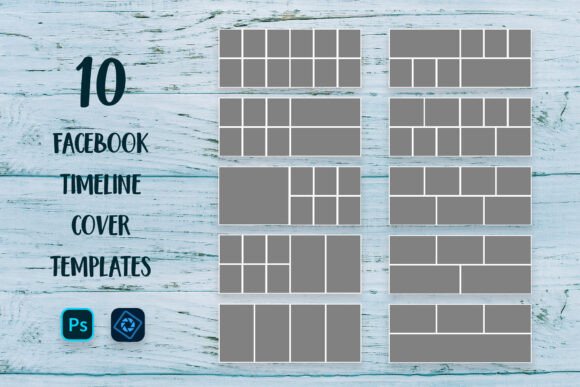
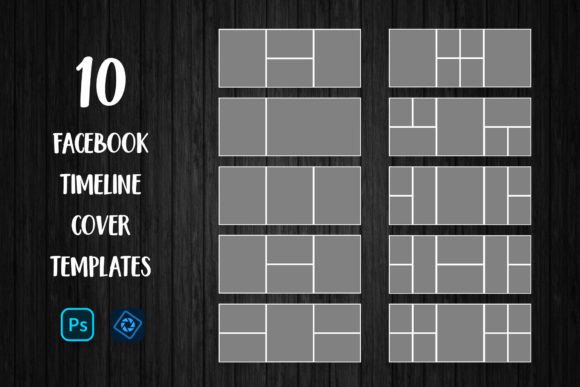
Standing out on Facebook requires more than just a good photo; it requires a cohesive visual strategy. For photographers, bloggers, and brand strategists, the Facebook PSD Collage Cover Template serves as a foundational design asset. Unlike generic drag-and-drop apps, these layered PSD files offer the granular control necessary to execute a professional brand identity. When you download a Social Media Banner Mega Pack containing 10 Facebook Timeline Cover Templates, you are not just getting image placeholders; you are acquiring a structured system for visual storytelling. This specific pack, optimized for the 851x315 pixel RGB color space, bridges the gap between raw creativity and technical precision, allowing you to produce high-quality social media graphics without starting from a blank canvas.
The Anatomy of Professional Layered Design
The true value of a Facebook PSD Collage Cover Template lies in its architecture. These files are built using Adobe Photoshop’s layering system, which separates background elements, text placeholders, and clipping masks. This separation is crucial for maintaining visual hierarchy. When you open the file in Photoshop or Elements, you encounter a "Smart Object" workflow. This is the industry standard for non-destructive editing. By placing your image above the designated clipping mask layer and selecting "Create Clipping Mask," your photo automatically conforms to the shape defined by the template—whether that is a geometric grid, a circular cutout, or an organic splash.
This method is particularly effective for maintaining consistency across a brand’s social media presence. For an entrepreneur or small business owner, the ability to swap out images while keeping the structural integrity of the design intact ensures that your timeline looks curated rather than chaotic. The 851x315px dimension is the native resolution for Facebook covers, meaning these templates are already optimized for the platform’s compression algorithms. You avoid the common pitfall of uploading a file that gets stretched or blurred, preserving the sharpness of your typography and the clarity of your photography.
Strategic Applications for Marketers and Creatives
While the technical specifications are important, the application of these templates is where the real work happens. For bloggers and content creators, the Facebook PSD Collage Cover Template is a tool for editorial design on social media. Instead of a single static image that might feel stale after a week, a collage allows you to showcase a mood board, a product collection, or a highlight reel of recent work. This is particularly useful for photographers who need to display multiple angles of a shoot or crafters who want to exhibit a range of textures and materials.
From a marketing perspective, the visual style of these templates leans toward modern typography and clean composition. They are designed to act as a canvas, not a competitor to your content. The included free fonts—often modern sans-serif or elegant script typefaces—complement the imagery rather than overwhelming it. When selecting a template from the pack, consider the "personality" of your brand. A minimalist brand might choose a template with ample negative space, while a vibrant lifestyle brand might opt for a grid with overlapping elements. The goal is to use these design assets to reinforce your brand identity, ensuring that visitors recognize your page instantly upon arrival.
Optimizing Visual Hierarchy and Readability
One of the most overlooked aspects of using a Facebook PSD Collage Cover Template is the interplay between text and imagery. These templates usually include designated areas for headlines or slogans. When utilizing these spaces, you must evaluate the font pairing. If the template uses a display font for the headline, ensure that any secondary text you add maintains readability at small sizes. The RGB color mode allows for vibrant, screen-optimized colors, but contrast remains key. A busy photograph placed behind a light-colored script font can render the text illegible.
To mitigate this, use the layers palette to adjust the opacity of the background image or add a subtle overlay behind the text. This is a standard practice in web design and social media graphics that ensures accessibility. Furthermore, the consistency of your cover photo should extend to your profile picture. The aesthetic of the collage—its color grading, filters, and style—should harmonize with your avatar to create a unified "billboard" effect at the top of your page. This cohesion builds trust with your audience, signaling that you are attentive to detail and professional in your presentation.
Practical Workflow and File Management
Adopting these templates into your workflow is straightforward, provided you follow the correct technical steps. The process of using "Create Clipping Mask" is the linchpin of the operation. It allows you to scale and reposition your photograph within the bounds of the template shape without cropping the original file permanently. This flexibility is vital for adjusting the focal point of an image to fit the composition of the cover.
However, a few practical considerations can save you time. First, always check the file format compatibility before purchasing. While these are PSD files, they are best utilized in the full version of Adobe Photoshop, though Adobe Photoshop Elements can handle the basics. Second, remember that the backgrounds shown in the previews—textures like wood, concrete, or marble—are examples. You will need to source your own high-resolution backgrounds to replace them, or use solid colors that align with your brand palette. Finally, when saving your work, export the file as a high-quality .jpg. While PNGs offer transparency, Facebook compresses them heavily, often resulting in larger file sizes without visual benefit for a cover photo. By adhering to these guidelines, you transform a simple template into a powerful marketing tool that drives engagement and solidifies your digital presence.