Professional Invoice Template: Elevate Your Brand's Finishing Touch
What’s Inside the Professional Invoice Template Package?
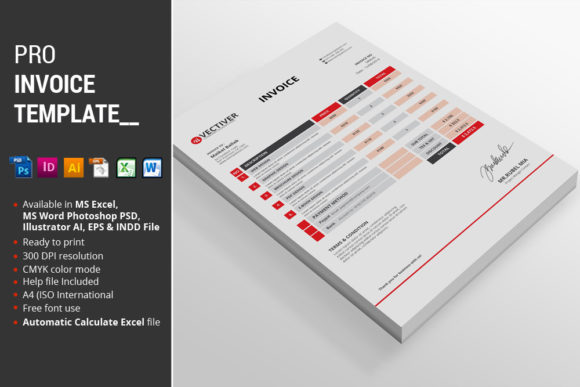
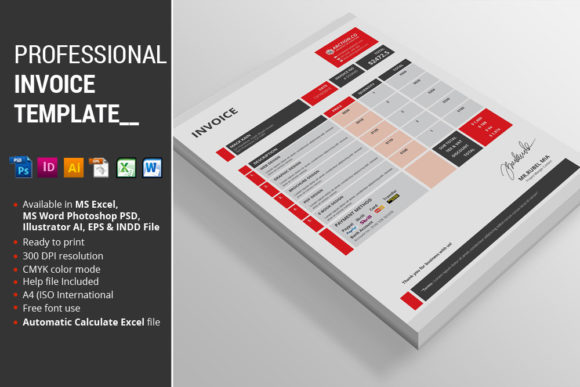
This isn't just a single file; it's a complete toolkit for professional billing. The package is delivered in multiple file formats to ensure seamless integration into your design workflow, regardless of your preferred software. Each version is available in two core color schemes—Red and Blue—to match different brand palettes.
Complete File List
- 2 MS Excel 2010 files [Red, Blue] – For automatic calculations and easy data entry.
- 2 MS Word 2010 files [Red, Blue] – For simple, editable text-based invoices.
- 4 Photoshop PSD files [Red, Blue] – Fully layered for maximum customization.
- 2 InDesign CS5 files [Red, Blue] – For professional print-ready layouts.
- 2 Illustrator files [Red, Blue] – Vector-based for infinite scalability.
- 2 EPS files [Red, Blue] – For broad compatibility with other vector software.
- Instructions PDF – A guide for setup, customization, and font links.
Key Features for Seamless Integration
Beyond its versatile file formats, this professional invoice template is built with features that save time and enhance your creative output. It’s engineered for real-world use, blending practicality with high-end design aesthetics.
- Automatic Calculations in Excel: The Excel files feature built-in formulas, eliminating manual math errors and speeding up your billing process.
- Four Color Options: While Red and Blue are included, the design is also available in Green and Yellow, allowing you to perfectly match your brand’s color palette.
- Standard A4 (ISO) Size: Ensures compatibility with international paper standards, making it ready for print anywhere.
- Fully Organized Layers: The PSD, Illustrator, and InDesign files have logically named and grouped layers, making customization intuitive and efficient for any designer.
- CMYK Color Mode: All design files are set up in CMYK, ensuring color accuracy for professional print design.
Practical Applications and Creative Workflow
A well-designed invoice does more than request payment; it communicates professionalism and strengthens your brand narrative. Here’s how you can leverage this template across your projects:
- Branding & Logo Design: Use the customizable Illustrator or InDesign files to incorporate your logo and brand typography directly, creating a seamless brand experience from proposal to payment.
- Marketing & Social Media: The clean layout can inspire the visual hierarchy for other marketing materials, such as social media graphics or email newsletters, ensuring consistency.
- Editorial & Packaging Design: The structured, elegant composition is ideal for freelancers in editorial or packaging design, presenting invoices that reflect the high-quality work you deliver.
- Digital Products & Web Design: For those selling digital assets or web design services, a professional invoice reinforces the premium nature of your offerings and enhances user trust.
Tips for Effective Use
To maximize the impact of your professional invoice, consider these design-focused recommendations:
- Maintain Consistency: Ensure the invoice’s typography, color scheme, and logo placement align perfectly with your website, portfolio, and other client communications.
- Prioritize Readability: Use the organized layers to create a clear visual hierarchy. Guide the client’s eye from the header to the line items and the total amount with ample white space.
- Scalability is Key: The vector files (AI, EPS) are perfect for creating invoices that may need to be scaled for different formats or included in a larger brand guidelines document.